WireGuard in Practice: Remote Access, Site-to-Site, and Mesh Overlay
WireGuard in Practice
WireGuard is a small, kernel-space VPN built on the Noise protocol and ChaCha20-Poly1305. Ten lines of config, one UDP port, and a keypair are all it takes to stand up. That minimalism lets it stretch from "one laptop onto a private network" to "the entire company's internal network fabric" without changing the core protocol.
This article walks through three canonical use cases where WireGuard is a good fit, covering config, routing design, and key lifecycle.
Key Facts
| OSS Details | For WireGuard basics and internal architecture, see the WireGuard OSS Introduction. |
|---|
Overview
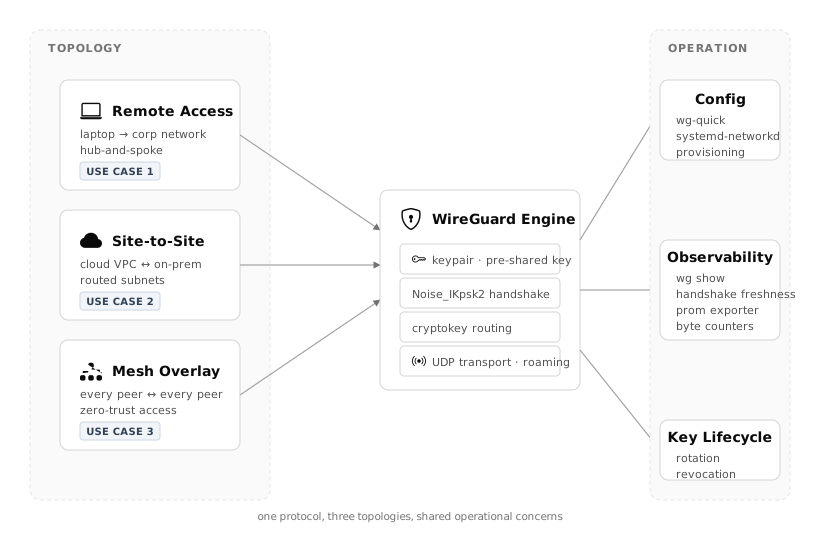
The same WireGuard engine (keypair · Noise handshake · cryptokey routing · UDP) underlies three different topologies (hub-and-spoke · site-to-site · mesh). The variation between use cases lives in routing design and the key-distribution model.
When WireGuard is the wrong choice
Before picking a use case, sanity-check against these anti-patterns:
- User-account coupling: WireGuard says "public key = identity." Mapping that to a human user with hire/leave lifecycle needs an external control plane (SSO integration, identity provider)
- UDP-blocked networks: WireGuard is UDP-only. Hotel captive portals and some enterprise firewalls will block it
- FIPS-140-style cipher requirements: fixed primitives (ChaCha20-Poly1305) may not match an approved cipher list
- Large existing IPsec investment: contracts, hardware, and operational muscle memory often outweigh the technical benefit
Use Case 1: Remote Access VPN (hub-and-spoke)
Scenario
50–200 employees need access to internal services from laptops at home, cafes, and client sites. The goal is to replace OpenVPN / IPsec with WireGuard to improve connect speed and roaming behavior on mobile networks.
Topology
- Hub: one (or two for HA) VPN gateway in the cloud
- Spokes: every client device
- Spokes do not talk to each other directly — everything flows through the hub
Config
Hub (/etc/wireguard/wg0.conf):
 1[Interface]
 2PrivateKey = <hub private key>
 3Address = 10.8.0.1/24
 4ListenPort = 51820
 5PostUp   = iptables -A FORWARD -i %i -j ACCEPT; iptables -t nat -A POSTROUTING -o eth0 -j MASQUERADE
 6PostDown = iptables -D FORWARD -i %i -j ACCEPT; iptables -t nat -D POSTROUTING -o eth0 -j MASQUERADE
 7
 8[Peer]
 9# alice@laptop
10PublicKey = <alice public key>
11AllowedIPs = 10.8.0.10/32
12
13[Peer]
14# bob@laptop
15PublicKey = <bob public key>
16AllowedIPs = 10.8.0.11/32
Client:
 1[Interface]
 2PrivateKey = <alice private key>
 3Address = 10.8.0.10/32
 4DNS = 10.0.0.53
 5
 6[Peer]
 7PublicKey = <hub public key>
 8AllowedIPs = 10.0.0.0/8, 172.16.0.0/12
 9Endpoint = vpn.example.com:51820
10PersistentKeepalive = 25
Key lifecycle design
This is where operational cost hides. Plain WireGuard has no built-in "revoke this user" flow, so pick one:
| Approach | Fit | Op cost |
|---|---|---|
Manual (delete the [Peer] block from hub, reload) |
<30 users | Low (script it) |
| wg-portal / wireguard-ui | 50–200 users | Medium (GUI) |
| Tailscale (SaaS) | Any scale, SSO required | Low (near-zero ops) |
| Headscale (self-host) | SSO required, must self-host | Medium (you own HA) |
💡 Tip: Tailscale and Headscale put a control plane (key distribution · ACL · NAT traversal) on top of WireGuard. They exist to solve "key management is tedious." Decide on this before team size makes manual management painful.
Pitfalls
- DNS: Forget
DNS =on the client and internal name resolution fails — "VPN connected but nothing works" - AllowedIPs scope:
0.0.0.0/0makes it a full-tunnel VPN (everything routes through the hub). Check whether the bandwidth cost is justified - PersistentKeepalive: mobile NAT sessions time out silently. 25 seconds is a safe default
- Port 51820 blocked: some public Wi-Fi networks block UDP. Keep a fallback plan (443/UDP, or udp2raw to tunnel over TCP)
Use Case 2: Site-to-Site VPN (cloud ↔ on-prem)
Scenario
AWS / GCP VPCs and an on-prem data center need a persistent link. There is already an IPsec VPN gateway, but adding a subnet requires vendor coordination and takes days. You want a lightweight self-managed sub-tunnel for management traffic only (CI/CD, backups, metrics).
Topology
- AWS side: one WireGuard gateway EC2 inside the VPC
- On-prem side: one WireGuard gateway behind the edge router
- Both gateways route subnets to each other
Config
AWS gateway (10.0.0.0/16 → 10.0.100.1):
 1[Interface]
 2PrivateKey = <aws gw private key>
 3Address = 10.200.0.1/30
 4ListenPort = 51820
 5
 6[Peer]
 7# on-prem gateway
 8PublicKey = <onprem gw public key>
 9AllowedIPs = 192.168.0.0/16
10Endpoint = onprem.example.com:51820
11PersistentKeepalive = 25
On-prem gateway (192.168.0.0/16 → 192.168.1.1):
 1[Interface]
 2PrivateKey = <onprem gw private key>
 3Address = 10.200.0.2/30
 4ListenPort = 51820
 5
 6[Peer]
 7# aws gateway
 8PublicKey = <aws gw public key>
 9AllowedIPs = 10.0.0.0/16
10Endpoint = aws-wg.example.com:51820
11PersistentKeepalive = 25
Routing design
- OS routing table: once
wg0exists, the other hosts in each site need to know "route the remote subnet via the gateway." Solve this with per-host routes or with gateway-side NAT - AWS VPC route table: set the next hop for
192.168.0.0/16to the WireGuard ENI. Open51820/udpin the security group - Asymmetric routing: splitting "outbound via WireGuard, return via IPsec" will drop sessions. Draw a clean boundary: "this subnet, this path"
High availability
Gateways are single points of failure; production deployments run two.
- Active-Active: ECMP across both. Since WireGuard is connectionless, multi-path works
- Active-Standby: VRRP via keepalived. A few seconds of loss on failover is usually acceptable
Pitfalls
- MTU: WireGuard adds 60 bytes (IPv4) or 80 bytes (IPv6) of overhead. Leaving
wg0at the default MTU breaks packets over paths that don't honor PMTU Discovery. Setting it around 1420 is the canonical fix - NAT on both sides: if both gateways sit behind NAT, you can't point
Endpointat a stable address. Put one side on a public IP (cloud) and have the other side originate the connection - Key storage: a
wg0.confleaked from a VM disk or snapshot is an instant VPN compromise. Store secrets in SSM Parameter Store / Vault and fetch at boot
Use Case 3: Mesh Overlay / Zero-Trust Network
Scenario
Microservices are scattered across AWS, GCP, and on-prem. You want every service-to-service hop encrypted and authorized at the IP level, without the engineering cost of adding mTLS to every service or standing up a full service mesh. Run WireGuard mesh between hosts and enforce L4 zero-trust.
Topology
- Full mesh (or partial, for whatever subset actually needs to talk)
- Each host has its own
wg0with a[Peer]entry for every other host it needs to reach
Reality: let a control plane manage the mesh
Manual N-host full mesh means N×(N-1) key-pair relationships. 10 hosts = 45 pairs. 50 hosts = 1,225 pairs. Managing that in handwritten wg0.conf files is not realistic.
For this use case, put a control plane on top of WireGuard. The main options:
| Product | License | Notes |
|---|---|---|
| Tailscale | Commercial (free tier) | SaaS · SSO · ACL DSL · auto NAT traversal |
| Headscale | BSD | OSS self-hosted implementation of Tailscale's control plane |
| Netbird | BSD | Self-hostable · IdP integration · GUI |
| innernet | MIT | Lean · CIDR-based ACL |
| Nebula | MIT | Not WireGuard but a similar design (from Slack) |
Why a mesh
With a classic "VPN gateway in the middle" the gateway is simultaneously a bottleneck, a single point of failure, and the crypto termination point. With a mesh:
- Traffic is encrypted end-to-end between source and destination hosts
- Gateway outages do not stop service-to-service traffic
- You can no longer MITM for SSL inspection — depending on your threat model, that's a feature or a bug
- IP-based ACLs are enforced autonomously at every host
ACL style (Tailscale-flavored)
 1{
 2  "acls": [
 3    { "action": "accept", "src": ["tag:web"],    "dst": ["tag:db:5432"] },
 4    { "action": "accept", "src": ["tag:web"],    "dst": ["tag:cache:6379"] },
 5    { "action": "accept", "src": ["group:ops"],  "dst": ["*:22"] }
 6  ],
 7  "tagOwners": {
 8    "tag:web":   ["group:ops"],
 9    "tag:db":    ["group:ops"],
10    "tag:cache": ["group:ops"]
11  }
12}
Use tags for semantic grouping instead of per-host IPs. Infrastructure churn leaves the ACL intact.
Pitfalls
- Control-plane dependency: if Tailscale / Headscale goes down, existing sessions survive but new handshakes fail. If you self-host Headscale, you own its HA
- DNS: MagicDNS (Tailscale) and friends auto-resolve "hostname → tsnet IP." Coexistence with corporate DNS needs explicit design
- Metrics: with many tunnels,
wg showis too noisy. A Prometheus exporter (e.g. prometheus-wireguard-exporter) that aggregates per-peer metrics is nearly mandatory - Interaction with Pod networks: Kubernetes CNIs (Calico, Cilium) can also do encryption. Running WireGuard on top double-encrypts and doubles bandwidth cost — pick one
Shared operational tips
Key generation and distribution
1# Always generate keys on the host that will use them
2wg genkey | tee privatekey | wg pubkey > publickey
Never hand-deliver private keys (no file transfer, no copy-paste). Generate on the host; register only the public key with the control plane.
Observability
- Connection health:
wg showfor last-handshake timestamp. Older than ~180 seconds usually means broken - Bandwidth:
wg show all transferfor per-peer byte counts - Prometheus: prometheus-wireguard-exporter exposes
wireguard_latest_handshake_seconds. Alert at >120s
Key rotation
Make rotation cheap so you can actually do it during an incident.
1# 1. Generate a new private key to a staging path
2wg genkey > /etc/wireguard/privatekey.new
3
4# 2. Register the new public key with the peer / control plane
5
6# 3. Swap in
7mv /etc/wireguard/privatekey.new /etc/wireguard/privatekey
8wg syncconf wg0 <(wg-quick strip wg0)
wg syncconf applies config without dropping existing tunnels. wg-quick down && up causes disconnection — use syncconf in production.
Choosing the right use case
Use remote access (UC1) when
- Existing OpenVPN / IPsec is slow or unstable
- Team is <200, SSO is a requirement → combine with Tailscale / Headscale
- Users often switch between Wi-Fi and LTE and need the tunnel to follow
Use site-to-site (UC2) when
- You need persistent links between clouds, or cloud ↔ on-prem
- Setup speed matters more than vendor-grade features
- Routed subnets are well-defined, and 2–4 gateways are enough
Use mesh (UC3) when
- Every service-to-service hop must be encrypted
- You want to remove gateways as bottlenecks
- IP-level L4 zero-trust is the target model
- You can afford a control plane (either self-hosted or SaaS)
WireGuard's protocol is small but the operational surface is not. Decide key distribution, revocation, and observability on day one — it dramatically reduces the ops cost compared with bolting them on later.