InfluxDB in Practice: IoT, Infrastructure Monitoring, and Application Metrics
InfluxDB in Practice
InfluxDB is a database purpose-built for time-series data: timestamped records written at high rate and queried over time ranges. For this workload it delivers throughput and storage efficiency that a general-purpose RDBMS or KVS cannot match.
This article walks through three use cases where InfluxDB is a natural fit in production, with the data model, query patterns, and operational pitfalls spelled out.
Key Facts
| OSS Details | For InfluxDB basics and internal architecture, see the InfluxDB OSS Introduction. |
|---|
Overview
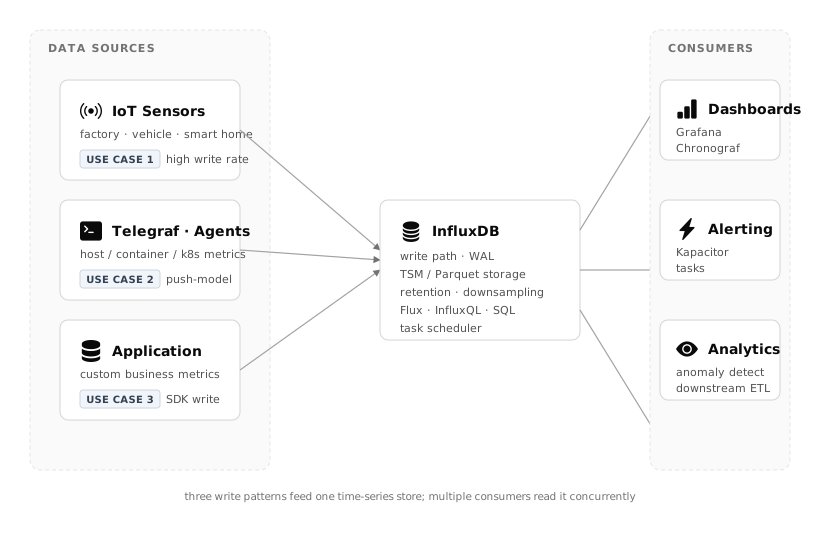
Writes converge from three distinct patterns (IoT / agents / applications), and reads fan out to dashboards, alerting, and analytics. This fan-in / fan-out shape is the canonical InfluxDB deployment.
Why a dedicated time-series database?
You can of course index a timestamp column on PostgreSQL and get by. It starts to hurt when:
- Writes hit tens of thousands to millions of points per second — B-tree index maintenance becomes the bottleneck
- Data grows into terabytes over years — row-oriented storage wastes disk
- Retention policies must be automatic — "raw data for 30 days, downsampled for 2 years"
- You need downsampling — rolling 1-second data into 1-minute and 1-hour averages
InfluxDB (Parquet + DataFusion in v3; TSM in v2) is designed for exactly this.
Use Case 1: IoT Sensor Data
Scenario
A factory production line has 10,000 sensors recording temperature, pressure, and vibration every second.
- Write rate: ~30,000 points/sec (10,000 sensors × 3 metrics)
- Reads: floor dashboard (last hour) + QA batch (last 7 days)
- Retention: raw for 30 days, 1-min aggregate for 1 year, 1-hour aggregate forever
Data Model
 1measurement: sensor_metric
 2tags:
 3  factory_id    = "osaka-01"
 4  line_id       = "line-A"
 5  sensor_id     = "s-0001"
 6  metric_type   = "temperature" | "pressure" | "vibration"
 7fields:
 8  value         = 23.4           (float)
 9  status        = "ok" | "warn"  (string)
10timestamp:      = 2026-10-11T12:00:00.123Z
Tags are indexed; fields are not. The rule of thumb: put things you filter or group by into tags, put the values themselves into fields.
Query (Flux)
1-minute average temperature for line A over the last hour:
1from(bucket: "sensors")
2  |> range(start: -1h)
3  |> filter(fn: (r) =>
4      r._measurement == "sensor_metric" and
5      r.line_id == "line-A" and
6      r.metric_type == "temperature")
7  |> aggregateWindow(every: 1m, fn: mean)
Pitfall: Series Cardinality
The number of unique tag combinations (series cardinality) controls index memory usage. Blow it up and the node dies.
- OK:
factory_id (10) × line_id (50) × sensor_id (10,000) × metric_type (3)= 15M series - NOT OK: putting
user_idortrace_idinto tags — they grow without bound
💡 Tip: unique IDs and high-cardinality values belong in fields, not tags. Think about cardinality before you commit to a schema.
Pitfall: Retention & Downsampling
Keeping raw data forever fills the disk. Use InfluxDB tasks (formerly Continuous Queries) to roll up:
1option task = { name: "downsample-1m", every: 1m }
2
3from(bucket: "sensors")
4  |> range(start: -task.every)
5  |> aggregateWindow(every: 1m, fn: mean)
6  |> to(bucket: "sensors_1m")
Combined with per-bucket retention policies (sensors = 30d, sensors_1m = 365d), you get bounded disk usage and fast queries over long time ranges.
Use Case 2: Infrastructure Monitoring with Telegraf + InfluxDB + Grafana
Scenario
Centralize metrics from hundreds of servers and thousands of Kubernetes pods — CPU, memory, network, disk IO, pod status — and alert on thresholds.
Reference Stack
 1Hosts / Containers / Pods
 2        │ (collect)
 3        ▼
 4     Telegraf      ← official agent · 300+ plugins
 5        │ (push)
 6        ▼
 7     InfluxDB      ← time-series store
 8        │ (query)
 9        ▼
10     Grafana       ← dashboards & alerting
InfluxDB vs. Prometheus
Prometheus is the Kubernetes-era default, but InfluxDB wins in these scenarios:
| Dimension | Prometheus | InfluxDB |
|---|---|---|
| Collection model | pull (scrape) | push (via Telegraf) |
| Long-term retention | requires remote storage | native, multi-year |
| Multi-site / NAT | pull makes it hard | push is simple |
| Query language | PromQL only | InfluxQL / SQL / Flux |
Pick InfluxDB when edge or IoT gateways sit behind NAT and can't be scraped, or when retention needs to span years.
Telegraf Configuration Points
 1[[inputs.cpu]]
 2  percpu = true
 3  totalcpu = true
 4
 5[[inputs.kubernetes]]
 6  url = "https://$NODE_IP:10250"
 7  bearer_token = "/var/run/secrets/.../token"
 8
 9[[outputs.influxdb_v2]]
10  urls = ["http://influxdb:8086"]
11  token = "$INFLUX_TOKEN"
12  organization = "glv"
13  bucket = "infra"
Tune buffering and flush interval, otherwise you either lose metrics during pod restarts or hammer InfluxDB with retries. Reasonable production defaults:
metric_batch_size = 5000metric_buffer_limit = 50000flush_interval = "10s"flush_jitter = "5s"(avoid thundering herd)
Use Case 3: Application & Business Metrics
Scenario
A SaaS product tracks business-level signals as time series for the PM dashboard:
- Active users (1-minute granularity)
- Billing events — count and amount
- Per-endpoint request count and P95 latency
- Feature usage counters
Commercial APMs (New Relic, Datadog) cover much of this, but their pricing is open-ended and you may want domain-specific metrics under your own control.
Data Model
1measurement: business_event
2tags:
3  env           = "prod"
4  service       = "billing"
5  event_type    = "subscription_created"
6  plan          = "pro" | "team" | "enterprise"
7fields:
8  count         = 1
9  amount        = 29.00
You will be tempted to put user_id in a tag. Don't — cardinality will explode. Push per-user analysis to a data warehouse (BigQuery, Snowflake) instead.
Writing
Either call the InfluxDB client directly from the app, or push through Telegraf's http / exec input. The Telegraf-in-the-middle pattern is more resilient.
 1from influxdb_client import InfluxDBClient, Point
 2
 3client = InfluxDBClient(url="...", token="...", org="glv")
 4write_api = client.write_api()
 5
 6p = (Point("business_event")
 7     .tag("service", "billing")
 8     .tag("event_type", "subscription_created")
 9     .tag("plan", "pro")
10     .field("count", 1)
11     .field("amount", 29.00))
12write_api.write(bucket="business", record=p)
Query
Approximate MRR by plan over the last 24 hours:
1from(bucket: "business")
2  |> range(start: -24h)
3  |> filter(fn: (r) =>
4      r._measurement == "business_event" and
5      r.event_type == "subscription_created" and
6      r._field == "amount")
7  |> group(columns: ["plan"])
8  |> sum()
When to pick InfluxDB — and when not to
Pick it when
- Writes are time-ordered and high-rate — thousands to millions of points per second
- Queries are time-range + tag filter dominated
- Retention policies and automatic downsampling need to be declarative
- You want to leverage the Telegraf + Grafana ecosystem out of the box
Skip it when
- Row-level UPDATE / DELETE is frequent — time-series DBs are append-only by design
- You need transactions across multiple rows → use an RDBMS
- Cross-cutting analysis along high-cardinality dimensions (user, session) → data warehouse
- The volume is small — a timestamp index on PostgreSQL is simpler and sufficient
InfluxDB is a specialized tool, not a general-purpose database. The adoption decision comes down to three questions: write pattern, query pattern, and retention requirements. Answer those first and you won't regret the choice later.