OpenGFW in Practice: Corporate Egress, Campus Networks, and Security Research
OpenGFW in Practice
OpenGFW is an open-source L7 packet filter running on Linux. It captures packets via Netfilter, runs DPI (Deep Packet Inspection) to identify HTTP / TLS SNI / DNS / QUIC / SSH / WireGuard and more, then chooses allow / block / log actions based on a YAML rule set.
This article covers three canonical use cases where OpenGFW is applied to networks you administer yourself.
⚠ Ethics and legality: OpenGFW is a dual-use tool. Every scenario in this article assumes a network you own or operate (or have explicit authorization for). If you deploy it on a corporate network, document the policy in employee handbooks and verify compliance with local communications-privacy law. Censoring or surveilling third-party networks is out of scope.
Key Facts
| OSS Details | For OpenGFW basics and internal architecture, see the OpenGFW OSS Introduction. |
|---|
Overview
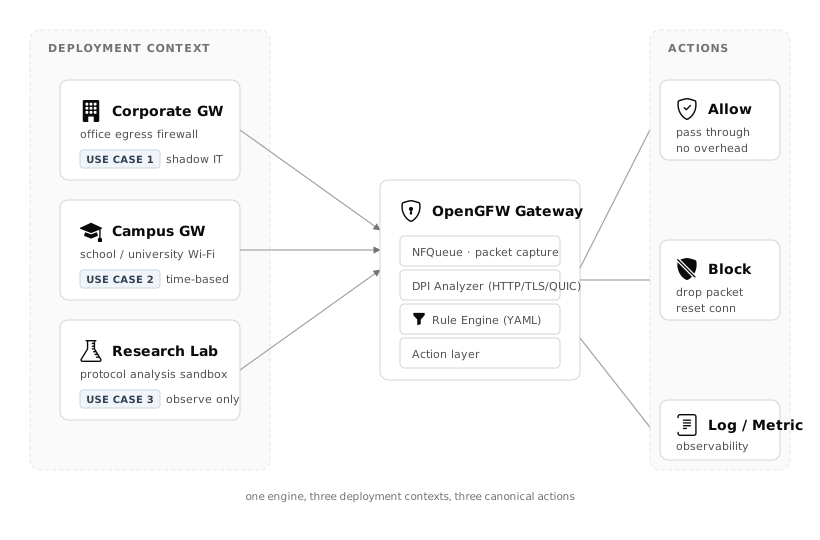
Three deployment contexts feed the same four-stage OpenGFW engine (capture → analyze → match → act). The variation across use cases is concentrated in the rule YAML.
What OpenGFW can and cannot see
OpenGFW does not decrypt TLS. It inspects plaintext and TLS handshake metadata.
Visible
- HTTP URLs and headers
- TLS SNI (destination hostname) and ALPN
- DNS query content (non-DoH)
- QUIC SNI (the exposed portion of the TLS handshake)
- WireGuard / OpenVPN protocol fingerprints
- BitTorrent / SSH / SOCKS5 signature-based detection
Hard or impossible to see
- Encrypted TLS payload content
- DNS queries wrapped in DoH (DNS over HTTPS)
- Heavily obfuscated VPNs (Tor obfs4, etc.)
- Any end-to-end encrypted application data
Set expectations accordingly: SNI/ALPN reveals which service is being contacted; it will not reveal what the user is doing inside that service.
Use Case 1: Corporate Egress Policy
Scenario
Place a Linux gateway on the egress path of a branch network. Block the following with OpenGFW:
- Cryptocurrency mining: Stratum protocol
- BitTorrent: non-work P2P traffic
- Unapproved SaaS (shadow IT): cloud storage not approved by IT
Rule YAML
 1rules:
 2  - name: block-bittorrent
 3    action: block
 4    expr: bittorrent != nil
 5
 6  - name: block-stratum-mining
 7    action: block
 8    expr: 'tcp != nil && string(tcp.payload[0:7]) == "stratum"'
 9
10  - name: block-unapproved-saas
11    action: block
12    expr: >
13      tls != nil &&
14      tls.req != nil &&
15      tls.req.sni in [
16        "pastebin.com",
17        "transfer.sh",
18        "anon-example-storage.net"
19      ]
20
21  - name: log-everything
22    action: log
23    expr: 'true'
Pitfalls
- False-positive hunt first: Flipping new rules straight to
blockwill break production. Run them aslogfor the first 1–2 weeks, feed events into Grafana (see UC3), observe false-positive rate, then flip toblockincrementally. - QUIC/HTTP3 adoption: In networks heavy with Chrome's QUIC traffic, SNI from TLS alone is not enough — enable OpenGFW's QUIC analyzer.
- No SSL inspection: If you need to decrypt and inspect TLS content, OpenGFW is not the tool — a MITM proxy (mitmproxy, Squid + Bump) is. OpenGFW stops at SNI/ALPN.
Use Case 2: Campus Network Application Control
Scenario
On a university or school Wi-Fi, limit certain games / streaming / social apps only during class hours (weekdays 09:00–16:00). Allow freely during lunch and after classes.
Rule YAML
OpenGFW itself has no time condition, so rotate rule files from a systemd timer on the host.
 1# daytime-rules.yaml (applied during class hours)
 2rules:
 3  - name: block-games
 4    action: block
 5    expr: >
 6      tls != nil && tls.req != nil && tls.req.sni in [
 7        "steamcommunity.com",
 8        "api.pubg.com",
 9        "live.leagueoflegends.com"
10      ]
11
12  - name: block-video-streaming
13    action: block
14    expr: >
15      tls != nil && tls.req != nil && (
16        tls.req.sni endsWith ".youtube.com" ||
17        tls.req.sni endsWith ".netflix.com"
18      )
 1# /etc/systemd/system/opengfw-schedule.service (excerpt)
 2ExecStart=/usr/local/bin/opengfw-schedule.sh
 3
 4# opengfw-schedule.sh
 5#!/bin/bash
 6hour=$(date +%H)
 7dow=$(date +%u)   # 1=Mon .. 7=Sun
 8
 9if [[ $dow -le 5 && $hour -ge 9 && $hour -lt 16 ]]; then
10  ln -sf /etc/opengfw/daytime-rules.yaml /etc/opengfw/active.yaml
11else
12  ln -sf /etc/opengfw/offtime-rules.yaml /etc/opengfw/active.yaml
13fi
14systemctl reload opengfw
Pitfalls
- VPN evasion: Students will try WireGuard / OpenVPN / Shadowsocks. Whether to also block VPN protocols is a policy call — research users may legitimately need a VPN.
- Privacy: Don't log more than necessary. Keep IPs but avoid storing full HTTP headers; set a retention policy up front.
- DoH is now common: Firefox ships DoH on by default, which neuters DNS-level filtering. Lean on SNI-based rules instead.
Use Case 3: Security Research & Classifier Evaluation
Scenario
In a network-security lab:
- Measure precision and false-positive rate of a new QUIC parser against real traffic
- Benchmark new IDS/IPS signatures
- Teach protocol identification hands-on in a graduate networking course
Rule YAML
Block nothing; log everything you want to study and build a labeled dataset.
 1rules:
 2  - name: observe-quic
 3    action: log
 4    expr: quic != nil
 5
 6  - name: observe-wireguard
 7    action: log
 8    expr: wireguard != nil
 9
10  - name: observe-tls-sni-sample
11    action: log
12    expr: 'tls != nil && tls.req != nil'
Pipeline with InfluxDB
OpenGFW emits structured logs. Forward via syslog or fluent-bit into InfluxDB, then build Grafana dashboards for protocol breakdowns over time. The data model:
1measurement: opengfw_event
2tags:
3  protocol  = "quic" | "tls" | "wireguard" | ...
4  action    = "allow" | "block" | "log"
5  rule      = "observe-quic"
6fields:
7  sni       = "example.com"
8  bytes     = 1420
See the "Application & Business Metrics" section of InfluxDB in Practice for the write-path pattern.
Pitfalls
- Human-subject protection: Even for research, captured traffic may include personal communication. Clear an IRB (institutional review) first. Treat SNI as potentially PII and consider anonymization.
- PCAP captures: Answer-keys for classification often require raw packets, but indiscriminate capture is legally gray. Narrow scope — e.g., "only devices owned by consenting researchers."
When to use OpenGFW — and when not to
Use it when
- You run the network yourself (office, campus, home, lab) and need app-level traffic control
- You have a Linux gateway where NAT traffic can be centrally captured
- Policies are documented, pre-announced to users, and legally sound
- A commercial NGFW (Palo Alto, Fortinet) is overkill but L7 control is needed
Don't use it when
- The network isn't yours (you'd be surveilling third parties — likely illegal)
- You need SSL inspection of TLS payload (use a MITM proxy)
- An existing NGFW/UTM already covers your requirements (ops cost, support)
- Logging would happen without user disclosure (communications-privacy risk)
OpenGFW is a lean tool for making L7 traffic visible on your own network. Understand what SNI/ALPN reveals and what it doesn't, apply it to networks you govern, and it will do a job that would otherwise require far heavier gear.